
Preguntas Frecuentes ¿Cómo Instalar una App de Android desde Internet?
Answers to all frequently asked questions about the Streamer App and Host Agencies for Streamer.
Para instalar descargar e Instalar LivChat y otras App de Streamer, debe de Habilita el “origen desconocido”: De forma predeterminada, tu dispositivo Android no permite la instalación de aplicaciones distribuidas fuera de sus tiendas autorizadas: Google Play en los teléfonos Pixel, Google Play y Galaxy Store en los teléfonos Samsung, y Appstore de Amazon en las tabletas Kindle.
Como los fabricantes tienden a personalizar el sistema operativo de Android para sus dispositivos, no se puede aplicar el mismo conjunto de instrucciones. Es por eso que proporcionamos dos ejemplos. Ver Preguntas frecuentes sobre LivChat.
For Google Base Systems
Estas instrucciones se aplican a un Android “puro”, como se ve en los productos Nexus, Pixel y en varios teléfonos que usan Android One.
Android 8.0 and higher
Step 1: Open Settings.
Step 2: Go to Apps & notifications.
Paso 3: toca Avanzada para expandir la configuración.
Step 4: Select Access to special applications.
Step 5: Tap Install unknown apps.
Paso 6: selecciona la aplicación de origen, como Chrome.
Step 7: Tap the switch next to Allow from this source to enable the download.
Android 7.0 Nougat and earlier versions
Step 1: Open Settings.
Step 2: Tap Security.
Paso 3: toca el interruptor al lado de Fuentes desconocidas para activar esta función. Aparece en Administración del dispositivo.
Paso 4: presiona Aceptar si es que aparece algún cuadro que pida tu confirmación.
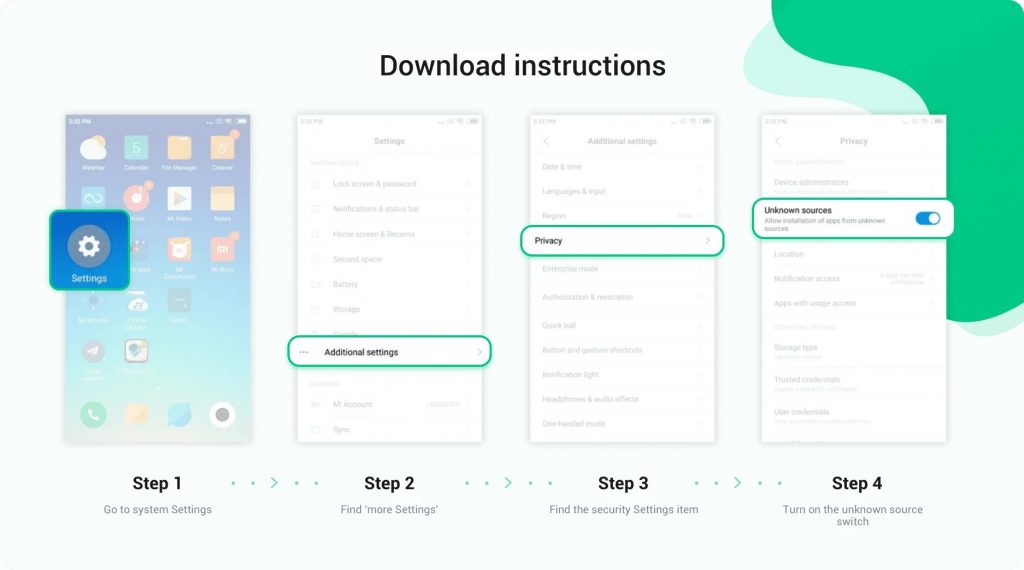
For Samsung Base Systems
Although Samsung uses Android, it modifies the interface, so the instructions are different. The screenshots shown above are from the latest version released in October 2020.
Android 8.0 Oreo and higher
Paso 1: abre la Configuración.
Paso 2: selecciona Datos biométricos y seguridad.
Step 3: Tap Install unknown apps.
Paso 4: selecciona la aplicación de confianza desde donde quieres que se instale el archivo APK, como Chrome o Mis archivos.
Step 5: Tap the switch next to Allow from this source to enable the download.
Android 7.0 Nougat and earlier versions
Step 1: Open Settings.
Step 2: Select Security.
Paso 3: toca el interruptor junto a Fuentes desconocidas para activar esta función. Aparece en Administración de dispositivos.
Step 4: Tap OK in the pop-up window.